This week the JS docs initiative was started to add inline documentation to all JS files of WordPress.
Continue reading "WordPress weekly recap #5: JS docs initiative and more"Blog
Change title of customize section
When creating a customize section, you define a title for it. Sometimes it can be useful to change this title during a customize session, for example, to reflect the value of a control, like the GIF shows:

I did not find a solution for that via the Customize JS API, so there was only the way via manipulating the DOM directly.
Continue reading "Change title of customize section"WordPress weekly recap #4: Gutenberg 2.1 and more
Not very much going on this week. Gutenberg 2.1 was released, that – among other things – contains visual changes of the up/down arrows.
Continue reading "WordPress weekly recap #4: Gutenberg 2.1 and more"Using a custom template for the head container of a customizer section
When you are opening a panel in the customizer, either you get options directly (like in the »Site Identity« panel) or links to sections (like in the menu area). By default, these links look like in the screenshot below for Slider settings – the section title in a light area background with an arrow on the right side.
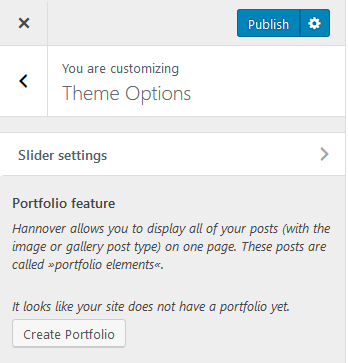
We want to change this so that we get a describing text with a button to open the section, as shown in the screenshot for Portfolio feature.
Continue reading "Using a custom template for the head container of a customizer section"WordPress weekly recap #3: Servehappy project needs design help and more
Servehappy is a WordPress feature project now, and the next step is getting the information page live. To get this done, the team needs help from designers.
Continue reading "WordPress weekly recap #3: Servehappy project needs design help and more"Closing a customize section via JS
Sometimes it can be helpful to close a section in the WordPress Customizer, for example, after a button was clicked. If you know how to do it, it is really easy to do, but I searched for a while recently until finding the solution.
With this one-liner you can close a section:
wp.customize.section('hannover_portfolio_archive_page_options').collapse();Code language: JavaScript (javascript)hannover_portfolio_archive_page_options is the ID of the section you want to close.
WordPress weekly recap #2: Servehappy roadmap and more
This week, the PHP team published a roadmap for the Servehappy project, that aims to make people with unsupported PHP versions update to a newer version.
Continue reading "WordPress weekly recap #2: Servehappy roadmap and more"Remove theme mod after button-click in the customizer
In the upcoming version of my Hannover theme, there should be an improved user experience in the Customizer besides a reworked design and code base. Among other things, the user should be able to remove sections with a button click (like known from removing a menu in the customizer). After that, not only the section should be removed from the customizer, but also the corresponding theme mods need to be removed from the database. This post shows my solution for that.
Continue reading "Remove theme mod after button-click in the customizer"WordPress weekly recap #1: Design chat
Not very much going on in the year’s first week – there was a design chat.
Design
Misc
- »Design meeting summary and updates«. The topic was finding volunteers for leading the weekly meetings and triage sessions.
- »Design chat summary December 4th«. Among other things, the team discussed its plans for 2018.
Creating dropdown-pages control with Customize JS API
All base controls from the core can be created with the Customize JS API, except the dropdown pages control, that renders as a select list with all pages of the site. This means, we usually need to create that control via the PHP API at the moment.
As a reaction to a wordpress.stackexchange.com question, Weston Ruter wrote a plugin that lets us create the dropdown pages control via the JS API (some details on that can be found in his answer to the question). The important part is the print_control_templates() method that creates a control template for the JS API to use when it should create a dropdown-pages control. This template is included in the customizer with the following call in the init() method:
add_action( 'customize_controls_print_footer_scripts', array( $this, 'print_control_templates' ) );Code language: PHP (php)